


Get your transit alerts by text or e-mail!
Get your transit alerts by text or e-mail!
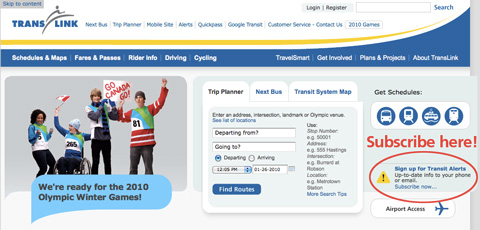
Hurrah – at long last, you can now get customized transit alerts through text-message or e-mail!
We’ve just launched the service, and you can sign up to get your updates through the TransLink homepage (or click here).
You’ll only get alerts about transit services that you’re interested in. When you sign up, you’re asked to register your regular transit trips, which tells the service what specific routes or services you want alerts about. (You can sign up for system-wide alerts too.)
And nicely enough, you can also select which days you want to receive alerts, so you won’t be bothered on the weekend about changes that only matter for you during weekdays.
Quirks and quarks
This is all new to us, so here’s a list of a few quirks we’re currently seeing, plus a few tips based on what’s happening behind the scenes. (And feel free to share any more you discover too!)
- You have to pick at least one stop for any bus route you select.
- You can pick multiple bus stops for any bus route you select. (Handy for those who want to know about only accessible bus stops, or whatever other reasons.)
- The bus stops are sometimes in a weird order for each route, and apparently this is due to the changed routes for the Olympic period. The alerts team is working on this! (The optimal solution of course is to have the stops listed end to end in order.)
- Does your transit journey involve taking either the Expo or Millennium Line along the shared Expo Line route? If so, you’ll notice that you can only select either the Expo or Millennium Line when you’re registering your journey, even though you are able to take either line. Don’t worry, just pick either one. All Expo and Millennium Line alerts will be sent to subscribers on both lists.
- If you subscribe via text, and your cell phone service is provided by Fido or Rogers, the alerts come in a bit funny. Instead of getting the alert directly, you get a text saying that you have an e-mail message waiting, and then you have to text back “Read” to get the actual alert texted to you. (Telus and Bell customers will just get the alert directly.)
- Peter’s comments below suggest a caution is in order: depending on your cell phone plan, you may be charged by your provider for incoming texts to your phone. Be sure you know whether e-mail-to-text messages are covered by your plan!
Here’s the explanation: TransLink is sending out the alerts through the e-mail-to-text service provided by all cell phone companies. (This way we don’t pay to send text messages.) And this is just how Rogers and Fido have chosen to set up their e-mail-to-text service – you get a notification that there’s an alert, and then you have to reply to get it. We can’t actually do anything about this—Rogers and Fido customers, you’ll have to talk to your service provider and ask them to adjust their setup if it bothers you!
Again, we’d love to hear from you! Feel free to let us know if you have more feedback or questions, and I’ll get you the answers as soon as possible.





I don’t rlly need to get this as I have a translink app on my iPod touch. So I can just mark my routes and they give me alerts where ever I am
Is that the TransLink app you’re talking about: the one that looks like m.translink.ca?
This service really isn’t SMS. It’s e-mail to SMS, which at least with Rogers and Fido incurs an extra charge. Unlike 3333.
Pretty lame.
Ah, I didn’t see the above. Managed to skim by it. Might want to say that Rogers and Fido customers *will be charged* if they “read” the Email to SMS messages to your post.
OK just set mine up…
it slow and painful setting a route up as the list boxes are so small and there is a lot of scrolling, especially for a traveller who makes multiple connections. Ideally there should be a trip planner interface where I can say from this point to another point.
Peter:
I wanted to just add some info from the Fido/Rogers websites.
Here’s what Fido’s website says about e-mail-to-text-charges:
So it seems that if you already have a text plan set up, Fido will not charge you for alerts. But if you don’t have a text plan, you will be dinged $0.15 per text.
I’m going to guess Rogers is set up largely the same way (I couldn’t find the exact cost for e-mail-to-texts on their website, though here’s the pertinent area, and it does say you can pay an extra $5 and get the emails sent directly to your phone).
Anyway, I think generally people are pretty cautious about signing up for text services if they don’t have a text plan in place already…. at least, hopefully!
And I’ll add a caution in the original post above too. Thanks!
@ jhen,
yes it is. ^_^
[…] The Buzzer blog » Get your transit alerts by text or e-mail! buzzer.translink.ca/index.php/2010/01/get-your-transit-alerts-by-text-or-e-mail – view page – cached Sign up for transit alerts through e-mail or text messaging! Here’s where the signup link is located on our front page (or just click this picture!) […]
Re: Fido
With Fido, when you receive a message sent from this alert service. You are required to reply to the message with “READ”, (This is with a regular, unlimited texting plan that I have) if you do not want to do so you have to pay $5 a month to have the messages sent without having to respond with READ. (Fido calls this “direct email to SMS.”)
Having to respond with READ to each and every message sent from the alert service would be pesky, and personally I would end up ignoring the messages after about the first week.
Is it possible that an RSS feed with this type of information would be available at a later date? Or would some of this information be available under the Translink developer program? That would be very helpful ..
Peter:
RSS feeds are definitely in the works. No ETA on them yet since everyone is working on Olympic stuff.
Also, it’s pretty silly that Fido/Rogers subscribers have to pay $5 extra for a service that Telus/Bell provides for free. Oh well, what can we do?
Jhenifer,
Fido used to provide free direct Text to SMS, it’s just been within the past year that they started charging for it. Rogers has all along. I don’t know exactly when they started charging for it, as it was very unreliable (days and days without it working.)
Good to hear that RSS feeds are in the works. Thanks for your prompt response! :)
This service is only useful when the alert is issued right away.
“097 trip departing Lougheed Stn to Coq. Stn at 12:54pm was cancelled.” sent at 1:26 PM is useless to me as that bus would have arrived at Coq Stn at 1:24 pm.
Indeed! Passing that along to the alerts team.
Is this system linked directly to the GPS bus monitoring system Translink uses, or does someone have to manually release the alert for it to be issued?
Mike: No, the alerts are manually put into the system by someone at Customer Information, so that might be why there’s a little bit of a delay. The GPS system on the buses doesn’t output directly into alerts.
I would also surmise there’s a bit of nuance involved too, where the GPS wouldn’t necessarily give you the right information for an alert — someone would still have to translate. For example, as we talked about above, if a bus is cancelled, then the GPS will report it just sitting there at the depot. But the GPS might also report a bus as stationary if the bus wasn’t able to start. In that case, the bus being stuck at the depot wouldn’t actually mean the whole trip is cancelled–they might just go get a different bus to use instead.
Btw, during the Olympics, staff will be on duty at Customer Information from 5:30 a.m. to 1:30 a.m. Also, real-time alerts are something we are going for, which would use the data from GPS monitoring system into real-time Next Bus info. (That’s still an ongoing project though!)
Well in any event, I received the following alert today notifying me about construction at a bus stop tomorrow and Wednesday before it occurs, which is great!
“Stop 58666 PinetreeWay at GuildfordWay temporary closed due to construction. Effective: Tues Feb 2 – Wed Feb 3.”
Well, that’s good to hear! :D
[…] sign up for alerts via text or e-mail […]
[…] the TransLink Twitter account for real-time service updates during the Paralympics! You can also sign up for alerts to be delivered to you via e-mail or text message. See this post for even more ways to get transit […]
[…] the TransLink Twitter account for real-time service updates during the Paralympics! You can also sign up for alerts to be delivered to you via e-mail or text message. See this post for even more ways to get transit […]
Hi there. Have been trying for 24 hours to create an alert profile. Actually 3 of us have been trying to set up a profile and it won’t accept any password that we give it. It’s supposed to be a minimum of 8 characters. If you use letters, you need at least 1 number, if you use numbers you need at least 1 letter. Have tried many different combinations an 3 separate browsers but it always says that the password isn’t following the specified guidelines. Is the system down? I called translink and they have no idea. Told me to call customer relations on Monday. Customer relations?
Thanks
Heather: I’m passing your comment on to our web staff to see if they can help you out. Sorry for the confusion over Customer Relations: Customer Relations is actually the division of our transit information call centre that answers more in-depth questions that customers might have — you can reach them at 604.953.3040, Mon. to Fri. from 8 a.m. – 8 p.m.
Heather: Oh look, the answer came back already! As Paul C suggested, you need to have a password with “a minimum of 8 characters, at least 1 non alpha numeric character, and at least 1 numeric character”. Non-alpha numeric means a symbol, like “!” or “#”.
In other words, you need BOTH a number and a symbol in your password, and the whole thing must be 8 characters or longer. So something like “trans$8link” would work, but “tran$link” or “translink8” would not.
Hope this helps!
@Heather
Have you tried creating a password with at least one numerical character and one non alphanumerical character. That is how my is created. Example would be trans$8link
A couple of things:
1) The password requirements seem needlessly complicated and kind of annoying. being something i wouldn’t check very often, i’ll probably have to use the ‘Forgot Password’ link any time I want to change my settings on here.
2) Is there any way to include the skytrain alerts without getting accessibility alerts? I don’t need daily alerts telling me about elevator/escalator maintenance.
Eric: thanks for the feedback on the passwords, I’ll pass it on to our web team. Although, as I’m sure you know, the requirements are to try and ensure passwords are not easy to guess, so I’m not sure how much leeway we really have. (Incidentally, have you noticed how many different standards for passwords there are around the internet in general? Some need both a number and symbol, some don’t ALLOW symbols, some even require a capital letter somewhere. As you’ve alluded to, it’s tough to keep a secure password if you can’t remember it!)
On the topic of accessibility alerts, this is definitely an issue, and our team is working on a way to allow you to opt-in to get those alerts instead of just receiving them by default. That should be around soon—I’ll keep you posted when it launches!
Thanks for the info
Hi! I’ve recently changed my transit alerts from email to SMS since I have an unlimited text message plan with Bell Mobility. However, every text alert I get looks like:
“donotreply@alerts.translink.ca:
(Transit Alert!)”
With no actual info, making the service rather unhelpful. Any ideas on why it looks like that?
I want to stop receiving these texts on my phone, How do I opt out ? I have at least 3 diff routes subscribed
Lauren: log into the TransLink website (the login link is at the very top right of every page on translink.ca) and you should be able to change your options!
Hi all,
Starting today, June 6, 2016, Customer Relations (CR) and Customer Information (CI – the folks on Twitter!) are merging into one call centre.
This means when you call 604-953-3333 you will still get transit information, but you can also leave feedback at this number as well.
Thanks!